YoWindow Weather and wallpaper
- 4.7
- Rating
- 10.00M
- Installs
- Free
- Price

 Analysis by App-foxy
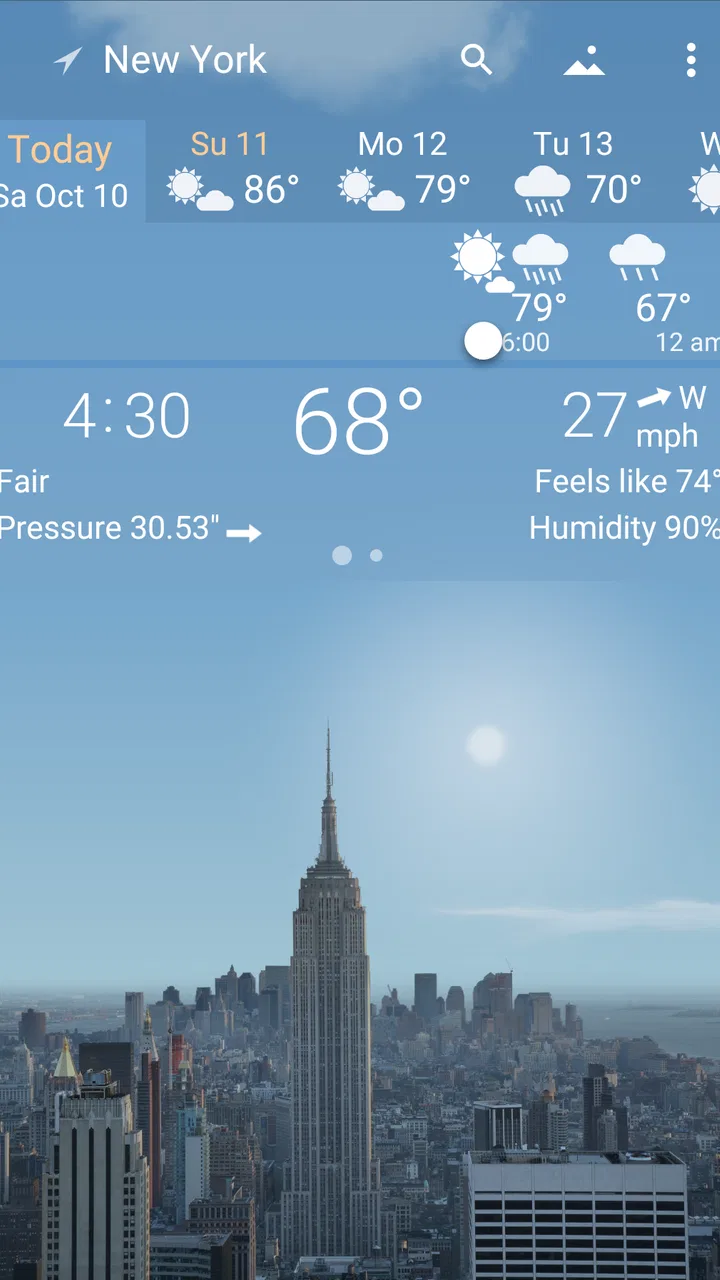
Weather apps usually compete by showing more numbers, but YoWindow Weather takes a different approach. I found it most interesting when I stopped treating it as a forecast screen and started using it as a quick visual check of what the day might feel like. The scene changes with the weather, the forecast is easier to absorb at a glance, and the app can also provide radar, live wallpaper, and widgets.
That visual style will not suit everyone. If you want a plain list of temperatures, a highly specialized storm-tracking tool, or the smallest possible weather utility, another type of app may be a better match. My experience is that YoWindow is strongest for people who want weather information to be both useful and pleasant to look at, without opening a separate app every time they need a quick answer.
What I considered before making a choice
When I compare weather apps, I look at four things first: how quickly I can understand the forecast, whether the information remains useful beyond the current temperature, how much space the app takes in my routine, and whether its visual extras genuinely help. YoWindow performed well on the first and third points because its central idea is easy to understand. Instead of presenting the forecast as a dense list, it turns changing conditions into a scene that reflects the time and weather.
You May Also Like

 Blood Strike: 2.5 Anniversary
Blood Strike’s Loadouts Turn Every Drop Into a Tactical Gamble
A close look at Blood Strike’s custom loadouts: how fast access to signature weapons reshapes its battle royale rhythm, rewards preparation, and narrows the gap between fights.

 Pandora - Music & Podcasts
Pandora’s Music Is Easy to Start, but Harder to Recover
Pandora’s strength is its low-effort path from a seed to a station. Its weak spot is how much confidence it asks you to place in connection, setup, and quiet recovery.

 8 Ball Pool
 Is Built on Rivalries, Rematches, and Routine
A close look at the rivalries, rematches, shared routines, and unanswered safety questions that turn a quick pool match into a persistent mobile community.

 Samsung Music
’s Quiet Strength Is Playing What You Already Own
Its reach comes less from spectacle than from dependable access to a personal library. That simplicity is both the app’s strongest retention engine and its ceiling.

 AccuWeather: Weather Radar
AccuWeather Review: A Quick, Clear Forecast for Everyday Decisions
For everyday plans, the best forecast is the one you can understand quickly. AccuWeather makes rain timing, radar, and local conditions easy to act on, with a few trade-offs.

 Hill Climb Racing
Why Hill Climb Racing Still Turns Crashes Into One More Run
A tiny car, a bumpy hill and one more upgrade: Hill Climb Racing keeps resurfacing because its simple chaos makes every near-miss feel personal.
More From Our News Desk



That matters in ordinary situations. Before leaving home, I often want to know whether the next few hours look dry, cloudy, or unpleasant rather than study a full weather report. A visual timeline can answer that faster than scrolling through several rows of figures. I still check the detailed information when planning something important, but for everyday decisions the scene gives me a useful first impression.
The app is published by Weather View LLC and belongs firmly in the weather category, although its wallpaper and widget functions make it feel broader than a standard forecast tool. It is free to install, with optional in-app purchases ranging from under one dollar to around ten dollars per item. That makes it easy to try without committing money first, while users who want a more complete experience should pay attention to which extras are included in the version they choose.
It is also designed for a general audience, with an Everyone age rating. The app has been available since the middle of the last decade, which gives it a more established feel than a brand-new weather experiment. Its popularity is reflected in a rating of about 4.8 from roughly half a million ratings, alongside more than ten million installs. I would not treat popularity as proof that every feature will suit me, but it does suggest that the unusual visual approach has found a sizeable audience.
Why the visual forecast is more than decoration
The animated landscape is the feature that separates YoWindow from most ordinary weather apps. A conventional forecast often asks me to interpret icons, percentages, and hourly rows. Here, the changing environment provides context. A bright scene, moving clouds, rain, or a darker evening view can make the forecast feel more immediate than a set of symbols.
I found this especially useful when checking the transition between parts of the day. Instead of asking only whether rain is expected, I can look at when the weather appears to change and decide whether an errand is better handled now or later. This is not a replacement for reading detailed conditions, but it is an effective first layer of information.
The visual design also changes how often I interact with the app. A normal weather screen is something I open only when I need it. A live wallpaper can keep the current atmosphere visible on the phone, which makes the weather part of the background rather than another task. That is a thoughtful idea for people who enjoy ambient information, although anyone who prefers a quiet, static home screen may find it unnecessary.
There is a useful trade-off here: the app’s charm encourages me to look at it, but the same presentation can make it feel less direct than a minimalist forecast. If I am rushing to compare several locations or find one precise detail, a straightforward weather service may get me there with fewer visual steps. YoWindow works best when the forecast’s time flow and atmosphere are important, not when I want a bare information panel.
Radar, widgets, and a practical daily routine
Radar gives the app a more practical side. I would use the visual forecast for a quick overview and radar when I need to judge whether a patch of rain is approaching. That two-step workflow is more useful than relying on the animated scene alone: first understand the general pattern, then inspect the movement of weather when timing matters.
For example, imagine I am preparing to walk to a station after work. In the morning, I can glance at the widget or wallpaper to get a broad sense of the day. Before leaving, I can open the forecast and radar to see whether the weather is changing around the time of my walk. If the rain looks close, I bring a coat; if the conditions appear stable, I avoid overplanning. The app does not remove uncertainty, but it makes the decision feel quicker and more informed.
Widgets are valuable for the same reason. They reduce the number of steps between noticing the weather and checking it. I prefer using a widget for routine awareness and opening the full app only when I need radar or a closer look at the forecast. This is one of the app’s less obvious strengths: it can serve both as a glanceable home-screen tool and as a fuller weather view, depending on how much attention I have.
There is also a small setup decision that affects the experience. A widget or live wallpaper is useful only if I give it a suitable place on the phone. On a crowded home screen, the weather can become another visual distraction. I recommend starting with one widget rather than enabling every presentation option at once. After a few days, it becomes clear whether the live view is genuinely helpful or simply attractive during the first hour of use.
How I would use the wallpaper without letting it become a gimmick
The wallpaper is most convincing when I think of it as passive information. I do not need to open the app to notice that the day has shifted from bright morning conditions to a wetter afternoon mood. That can be helpful for people who spend much of the day checking their phone briefly rather than reading a full forecast.
At the same time, wallpaper is not equally useful on every phone or for every person. Some users want their background to be visually calm, and others may prefer to preserve battery or reduce movement on the home screen. I would not choose YoWindow solely for this feature. I would choose it because the wallpaper complements the forecast and then decide whether it belongs in my daily setup.
My practical advice is to judge it after normal use rather than during the first few minutes. The novelty is obvious immediately, but the real question is whether the changing scene helps me make decisions. If I regularly notice the weather before going outside, it earns its place. If I keep ignoring it, the standard app view and a simple widget are probably enough.
Where YoWindow wins, and where another weather app may fit better
YoWindow wins when the reader wants weather to be understandable at a glance and enjoyable to revisit. The combination of a visual forecast, radar, live wallpaper, and widgets gives it several ways to fit into a routine. I also like that the app does not force me to choose between a decorative experience and practical information; I can use the scene for orientation and radar for a more focused check.
It is particularly well suited to people who find conventional forecast tables tiring. Parents checking conditions before school, commuters deciding what to wear, and anyone who likes seeing the progression of a day can benefit from the visual timeline. It may also appeal to users who want a weather widget that feels more distinctive than a static temperature card.
The main limitation is that visual clarity and information density are not always the same thing. When I need to compare many details, a traditional weather app with a compact list may be faster. A specialized radar application may also be preferable for someone who follows severe weather closely and wants the map to be the central experience. I would not recommend YoWindow as the only tool for high-stakes outdoor planning where local warnings and specialist information matter more than presentation.
There is another trade-off for people who track several locations. YoWindow’s atmosphere is most engaging when I am looking at one place and following its changing conditions. If my routine involves rapidly comparing cities, airports, or travel destinations, a simpler multi-location layout could be more efficient. That does not make YoWindow weak; it means its design favors depth of experience for a selected place over rapid scanning across many places.
Users who dislike optional purchases should also think about their expectations. The app is free, so trying the core experience is straightforward, but some additions cost money individually. I would begin without buying anything, use the forecast, radar, and available widget options, and then decide whether a paid extra solves a real problem. Paying for a feature I use every day makes more sense than collecting visual additions simply because they are available.
What switching feels like in practice
Moving from a basic weather app to YoWindow is not difficult, but it does require a small change in habits. With a standard app, I usually open a page, read the temperature, and close it. Here, I need to spend a little time understanding how the visual timeline communicates the day. Once that becomes familiar, the process is quick, but the first impression can feel less direct if I am accustomed to rows of numbers.
I would set it up in stages. First, choose the location I care about most and learn the main forecast view. Next, use the radar during a few ordinary weather changes instead of opening it only during dramatic conditions. Finally, add either a widget or wallpaper, not both immediately, and see whether it improves the routine. This staged approach avoids confusing visual appeal with lasting usefulness.
The cost of switching is therefore mostly attention rather than money. The app is free to start, and the basic decision is whether I like its way of presenting weather. The optional purchases become relevant only after I know which parts I actually use. That is a healthier way to approach the app than assuming every extra is necessary from the beginning.
One question many readers will have is whether the app can replace their current weather tool. My answer is: often for everyday checks, but not automatically for every purpose. If the current app already provides the exact alerts, location coverage, and specialist detail I depend on, YoWindow may work better as a complementary visual forecast. If my main frustration is that ordinary weather screens feel dull or hard to read, it has a stronger chance of becoming my primary choice.
Another practical question is whether the app is suitable for someone who only wants a quick temperature. It can be, especially through a widget, but it may offer more personality and visual movement than that person needs. A very small, no-frills weather utility will probably be more efficient. YoWindow earns its space when I appreciate the forecast’s changing context, not merely the current number.
For travel, I would use it as a planning aid rather than my sole source of certainty. Looking at the visual progression and radar can help me decide when to go out, but I would still check the destination carefully before a long journey or outdoor event. The app’s strength is helping me interpret the day; it should not encourage me to ignore changing conditions or official guidance.
My recommendation after using the full concept
I recommend YoWindow Weather to anyone who wants a weather app that feels alive without abandoning useful tools. The visual forecast is not just a decorative layer; it changes how quickly I understand the rhythm of the day. Radar adds a more grounded way to inspect incoming conditions, while widgets and live wallpaper make the information available before I deliberately open the app.
I would recommend starting with the free experience and resisting the urge to buy extras immediately. Give the main forecast enough time to become part of your routine. If the scene helps you decide what to wear, when to leave, or whether to postpone an errand, then the app is doing something valuable. If you keep searching for a denser table or a more specialized map, that is a clear sign that another category of weather app fits you better.
For me, the best reason to keep it installed is the balance between atmosphere and utility. Many weather apps are efficient but forgettable; YoWindow makes the forecast easier to notice and more pleasant to check. Its weaknesses are equally clear: it may feel busy to minimalists, less efficient for heavy multi-location comparison, and not specialized enough for serious weather monitoring.
My clear advice is to choose it when you want weather information that you can understand at a glance and enjoy seeing throughout the day. Skip it if your priority is the smallest interface, the fastest numerical comparison, or a dedicated professional-style radar experience. For everyone in between, this free weather app from Weather View LLC is worth trying, especially because its distinctive approach becomes useful only after it has been part of your normal routine for a while.
FAQs for YoWindow Weather and wallpaper
01What is YoWindow Weather and how does it work?
YoWindow Weather is a unique weather app that provides real-time weather updates alongside a picturesque, animated landscape that changes according to the current weather and time of day. The app uses data from reliable weather sources to offer accurate forecasts and provides a visually engaging way to stay informed about weather conditions.
02Can I customize the landscapes in YoWindow Weather?
Yes, YoWindow Weather allows users to customize their experience by selecting different animated landscapes. These include options like a serene village, a bustling city, or a tranquil seascape. Users can also upload their own photos to use as backgrounds, adding a personal touch to their weather updates.
03Is YoWindow Weather available for both Android and iOS devices?
YoWindow Weather is available for both Android and iOS platforms, ensuring a wide range of users can access its features. The app is designed to run smoothly on various devices, providing the same immersive weather experience whether you're using a smartphone or a tablet.
04Does YoWindow Weather offer accurate weather forecasting?
YoWindow Weather provides accurate and reliable weather forecasts by sourcing data from trusted meteorological services. The app includes current weather conditions, hourly forecasts, and extended forecasts, making it a comprehensive tool for planning your day or week ahead with confidence.
05Are there any in-app purchases or subscriptions in YoWindow Weather?
YoWindow Weather offers a free version with essential features, but users can opt for in-app purchases to unlock premium features, such as additional landscapes and ad-free usage. There may also be subscription options available, providing users with access to enhanced functionalities and future updates.
Pros
- Beautiful
- dynamic weather animations.
- Accurate and up-to-date forecasts.
- Customizable backgrounds and themes.
- User-friendly interface with intuitive controls.
- Supports multiple locations for easy tracking.
Cons
- Ads can be intrusive in free version.
- Battery consumption may increase.
- Limited features without premium upgrade.
- Occasional lag on older devices.
- Some features require internet connection.

YoWindow Weather and wallpaper
Gallery